Rydoo AI Policy Assistant clarifies employees' questions in-app, even before submitting any expense.
Employees can access the Policy Assistant from their Rydoo dashboard.
What you can do with the Policy Assistant
Users can:
- Ask questions about the company expense policy (e.g., “Can I expense during the weekend?”)
- Get a clear, concise answer
- See supporting snippets from the policy
- See the policy document for full context
The assistant is designed to stay focused on expense-policy questions, meaning answers are based only on the policy document your admins upload.
How to use it:
Employees can access the Policy Assistant directly from Mobile and on Web. Look for the Policy Assistant widget or the Ask Policy Assistant button.
Mobile
1. Open the Mobile App and click in "More".
- Open the policy assistant.
- Type your question in plain language.
4. Review the answer and the supporting policy snippets.
5. If needed, click View full policy to see the complete document.
Web
- Open the Policy Assistant
- Type your question in plain language.
- Review the answer and the supporting policy snippets.
- If needed, click View full policy to see the complete document.
Some example questions
- “Can I expense a client dinner?”
- “What is the limit for hotel nights?”
- “Do I need approval if I go over a threshold?”
💡 Note: Policy Assistant answers are AI-generated and based solely on the policy document your admin has uploaded. For binding policy interpretations, always verify with your Finance or HR team.
Admin guide: set up the Policy Assistant
-
Go to Admin settings, navigate to Policy Center and click on ‘+ Add new policy’
-
Upload your expense policy file (PDF or DOCX).
After uploading, Rydoo will process and convert your document. You'll see a processing indicator — this typically takes 45 seconds to 1 minute.
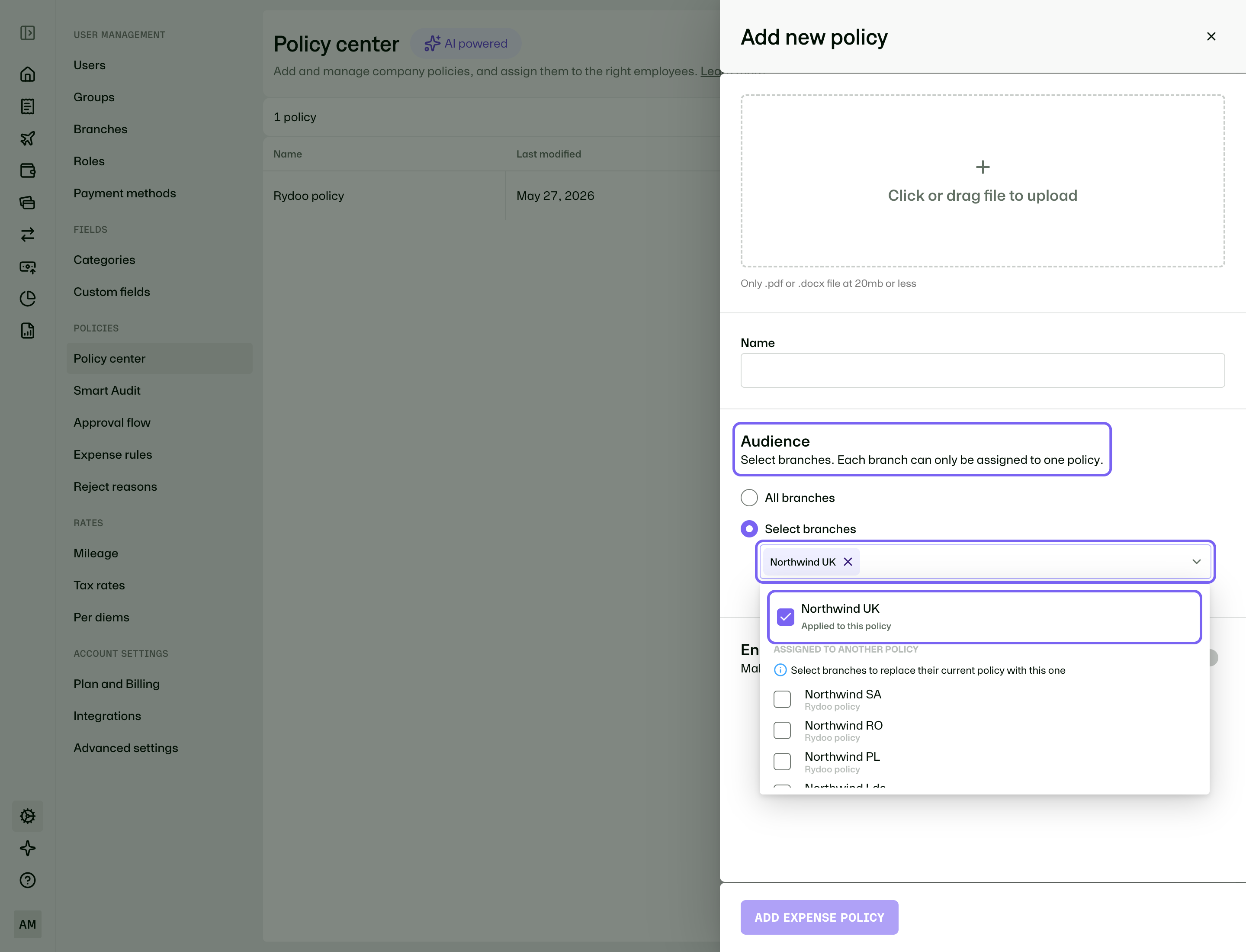
3. Define the audience for the policy. You can choose between All branches / Select branches.
4. Once uploaded, you can make any in-app edits needed to clarify or improve the converted policy text.
5. When ready, set the status to active and click Add expense policy
You can always return to the policy to edit the text, replace the uploaded file, or delete the policy. Replacing the file will re-process the document and update the assistant's answers.
Admin guide: limit policy to specific branches
💡 Recommendation: Enable the Policy Assistant for admins first so you can validate answers and fine-tune the policy content before rolling it out to everyone.
FAQ
- Can I upload multiple policies?
Yes. You can have more than one policy per company.
- Can I limit the policy to certain branches?
Yes. You can limited to specific branches.
- Does Rydoo use our policy document to train AI models?
No. Company policy documents are not used for model training.
- Are user questions stored?
Yes. Questions are stored for chat context within your session, but not used for AI training. Questions are automatically deleted after 90 days. Chat conversations are private and not visible to admins.
- How long does the policy upload take?
Upload time is typically 45 seconds to 1 minute.
- What is not supported in the uploaded policy?
Images are not supported. If your uploaded document contains images, they will not be visible in the converted policy in Rydoo.
- Is the Policy Assistant available on mobile?
Yes. It is available on Mobile.
- What if the Policy Assistant can't answer my question?
The assistant will let you know if it can't find a relevant answer in the policy. In that case, check the full policy document or contact your Finance or HR team for guidance.
- Which browsers and devices does the Policy Assistant support?
The Policy Assistant is currently available on desktop browsers (Chrome, Edge, Firefox, Safari) and mobile support.